





Key insights
- Microsoft will enable usage-based billing by default for eligible new Copilot Business purchases through CSP, now scheduled for January–March 2027.
- The default spending limit is 4,000 Copilot Credits per user per month, not a free credit allowance.
- For 100 users, the combined default per-user limits could permit 400,000 credits monthly.
- New qualifying purchases can also enable usage-based billing for existing Copilot Business licenses in the same tenant.
- CSPs should review customer spending policies, configure usage alerts, and prepare their billing workflows.
Microsoft 365 Copilot adoption is growing rapidly. In its FY2026 fourth-quarter results, Microsoft reported more than 30 million paid Copilot seats. As Copilot expands beyond fixed subscriptions into usage-based AI services, your billing responsibilities are changing too.
Starting in early 2027, eligible new Copilot Business purchases through CSP will automatically enable consumption-based billing, allowing customers to generate additional charges through eligible AI services.
For your finance and operations teams, this means more costs to track, reconcile, and bill accurately. Here is what you need to know about these changes and how to manage Copilot Credit spending before billing issues arise.
What changes with Copilot usage-based billing in 2027?
According to Microsoft’s November 2026 Partner Center announcement, usage-based billing will become the default configuration for eligible new Microsoft 365 Copilot Business purchases during January–March 2027, instead of December 1, 2026.
Previously, partners had to manually set up an Azure subscription and configure billing to enable usage-based services. Under the new process, eligible Copilot Business purchases include the Azure subscription setup needed for usage-based billing, making activation easier.
This applies to eligible standalone Copilot Business licenses and bundles. A qualifying new purchase will also enable usage-based billing for existing Copilot Business licenses in the same tenant.
What are Copilot Credits, and how does usage-based billing work?
Copilot Credits measure consumption of eligible AI services. Usage varies depending on the service and tasks performed. Microsoft’s initial scope includes services such as Copilot Cowork, Work IQ APIs, and GitHub Copilot Harness.
Unlike fixed subscription fees, these charges depend on actual consumption. Your customers’ monthly bills may therefore include both recurring Copilot Business license fees and additional AI usage charges.
What does the 4,000-credit default actually mean?
The 4,000-credit limit is a spending cap per user, not a free credit allowance. It sets the maximum number of credits each user can consume. Customers are charged for actual billable consumption, subject to their billing arrangements.
| Feature | What’s changing |
|---|---|
| Billing activation | Automatic for qualifying new purchases |
| Default per-user limit | 4,000 credits/month |
| Billing basis | Actual metered consumption |
| Limit management | Partner Center and Microsoft 365 admin center |
Source: Microsoft Learn — Usage-based billing for Copilot Business in Partner Center.
Why the 4,000-credit default matters for your CSP billing operations
Managing AI consumption is now a key financial responsibility. According to the FinOps Foundation’s State of FinOps 2026 report, 98% of surveyed FinOps practitioners manage AI spending, compared with 63% in 2025.
For CSPs, Microsoft’s new billing model means tracking variable AI consumption alongside fixed subscription fees. This introduces three challenges.
Unexpected consumption charges
Your customers may understand what they pay per Copilot license but not realize that certain AI experiences generate additional consumption charges. Without reviewing spending limits, they could receive higher-than-expected invoices, leading to billing disputes or payment delays.
More complex billing and reconciliation
With seat-based licensing, you usually know the number of licenses and their recurring costs in advance. Usage-based billing adds another layer, as you need to track how many credits customers use, which services generate charges, and how those costs appear in Microsoft’s reconciliation data.
Your finance team must then apply the agreed customer pricing and ensure all usage charges are billed in the correct cycle.
Greater pressure on margins and customer trust
As a Direct Bill CSP, you manage billing with Microsoft and invoice your customers directly. Missing consumption charges, applying incorrect prices, or dealing with billing disputes can hurt your margins and delay payments. These risks become harder to manage as your Copilot customer base grows.
Who needs to prepare for Copilot usage-based billing?
Both Direct Bill CSPs and MSPs should prepare for the 2027 rollout, although their responsibilities will differ.
Direct Bill CSPs
As a Direct Bill CSP, you handle customer purchases and billing directly through your Microsoft partner account. With the new default, you will need to manage another type of consumption alongside existing subscription and Azure charges.
You will need to check which customers have usage-based billing enabled, whether their spending limits align with approved budgets, and how you’ll reconcile and invoice any additional charges. Your immediate priority should be to review consumption exposure and validate your billing workflows.
Managed Service Providers (MSPs)
If you are an MSP managing Microsoft 365 environments, your focus should be on helping customers understand and manage their AI consumption. This may involve recommending spending limits, setting up policies, tracking usage, and helping customers understand unexpected charges.
Your financial responsibilities, however, depend on whether you are also the transacting CSP or simply managing services for another partner.
| Responsibility | Direct Bill CSP | MSP |
|---|---|---|
| Primary concern | Billing accuracy and margins | Customer cost control |
| Main risk | Unreconciled consumption charges | Unexpected customer spend |
| Priority action | Validate reconciliation and invoicing | Review customer spending policies and usage |
| Customer engagement | Explain charges and invoice terms | Explain usage limits and service access |
If you provide both CSP billing and managed services, you will need to address both sets of responsibilities.
How to cap Copilot usage-based billing before the 2027 rollout
To prepare, check customer eligibility, estimate potential costs, configure spending limits, and ensure your billing process can handle additional consumption charges.
Here are seven steps to follow.
Step 1. Identify which customer subscriptions will be affected
Start by identifying customers whose purchases could activate Copilot usage-based billing. According to Microsoft’s Partner Center guidance, the change applies to eligible Copilot Business SKUs, including standalone offers and Microsoft 365 bundles.
Review your upcoming transactions and identify:
- Customers purchasing eligible Copilot Business licenses.
- Existing customers adding seats through qualifying purchase events.
- Customers converting eligible trials into paid subscriptions.
- Customers who already have a Copilot spending or billing policy.
- Customers in markets where the rollout is supported.
A qualifying new purchase will also enable usage-based billing for existing Copilot Business licenses in the same tenant. Therefore, your assessment should cover the customer’s existing Copilot Business users, not just newly purchased seats. Also, Partner Center creates a default spending policy only if the tenant doesn’t already have an applicable policy.
Step 2. Calculate your customers’ potential Copilot Credit exposure
Once you have identified affected customers, estimate their potential monthly consumption using this formula:
Potential monthly credit exposure = Number of eligible users × Per-user monthly credit limit, up to the tenant limit
For example, 50 users with the default 4,000-credit limit would have a combined per-user allowance of:
50 × 4,000 = 200,000 Copilot Credits per month.
This does not mean customers will consume or be billed for that amount. Actual usage and applicable tenant-level controls may reduce consumption. Compare this potential exposure with each customer’s expected usage and approved budget to determine whether their default limits need adjusting.
Step 3. Review and configure Copilot spending policies
Microsoft’s spending policies let you control which users can consume credits, which services are covered, and how much they can use monthly. You can manage default billing settings through Partner Center. For more advanced controls, go to:
Microsoft 365 admin center → Copilot → Cost Management → Configuration
Here, you can review or create spending policies for supported services.
| Spending control | What it does | When to use it |
|---|---|---|
| Tenant/policy-level limit | Restricts total monthly consumption covered by a policy | Set an overall spending ceiling |
| Per-user limit | Restricts individual credit consumption | Prevent one user from exhausting the budget |
| Group-based policy | Applies rules to selected groups | Set different limits by department |
| Service selection | Determines which services are covered | Control specific AI workloads |
When configuring spending policies, keep three things in mind.
- Check minimum limits: Microsoft’s guidance specifies a minimum of 2,000 credits per user monthly for applicable policies.
- Review overlapping policies: When multiple policies cover the same user and service, the highest applicable limit generally takes precedence. An unlimited policy could override a stricter one.
- Check Auto-apply new services: When enabled, new services may automatically be included in existing policies. Review this setting if customers prefer individual approvals.
Also, reducing limits, disabling consumption, and deleting policies are different actions. Check Microsoft’s latest Partner Center guidance before making changes.
Step 4. Set usage alerts before customers reach their limits
Spending limits control consumption, but you also need to monitor usage. When customers reach their limits, access to affected AI services may stop until the allowance resets or the policy changes.
Microsoft offers two types of alerts:
- Policy-level alerts: Notify administrators or designated stakeholders when consumption reaches a set threshold.
- User-level alerts: Warn users when they’re approaching their monthly credit limits.
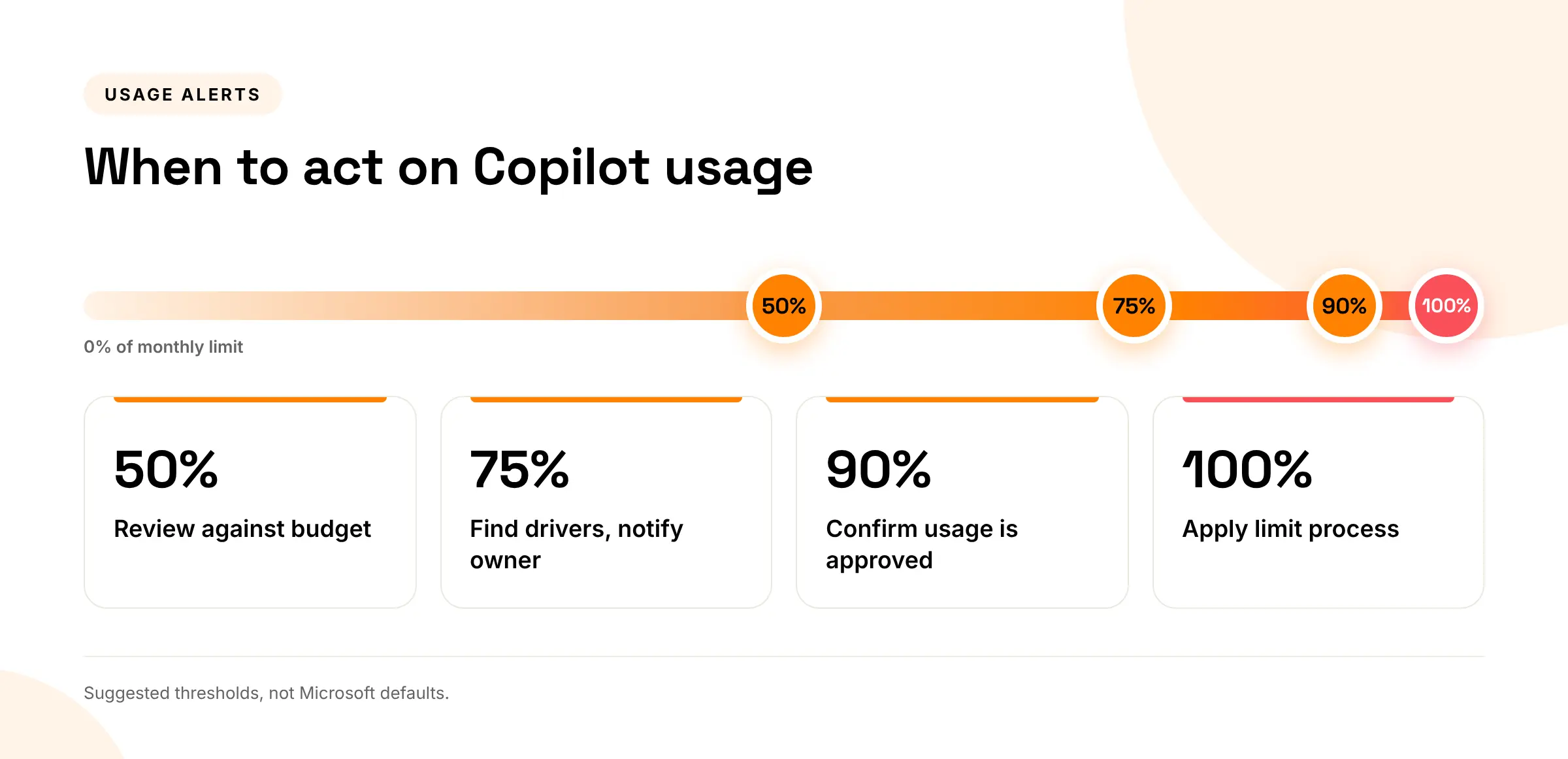
You should also look at how early in the month customers reach these thresholds. For example, using 75% of their monthly allowance by day five is more concerning than reaching the same level near month-end.
Make sure each alert has a clear owner, so your billing and operations teams know who reviews usage, contacts the customer, and approves any changes.
Step 5. Validate how Copilot consumption appears in your billing data
Managing consumption is important, but you also need to make sure every charge is billed correctly. Microsoft includes Copilot usage-based charges in existing Azure consumption reconciliation files. While you don’t need a separate billing file, your system must be able to identify and process these additional charges.
Three fields are particularly important:
- Product ID: Identifies the product.
- SKU ID: Identifies the relevant offer or SKU.
- Meter ID: Identifies the metered usage.
Along with customer and subscription details, these fields help you match consumption to the correct account. Remember, Copilot Business licenses and usage-based charges are billed separately. A customer with 100 licenses, for example, may incur additional charges from only a few users.
Before generating invoices, check that:
- Copilot usage appears in reconciliation records.
- Charges are assigned to the correct customer.
- Agreed pricing rules are applied.
- License and consumption charges are clearly separated.
- Invoices match Microsoft’s billing data.
For Direct Bill CSPs managing multiple customers, automating reconciliation can reduce manual work and billing errors.
Step 6. Establish a customer approval and billing process
Before customers begin using eligible services, explain which charges are included in their Copilot subscription and which depend on consumption.
Agree on the following billing arrangements:
- Approved monthly consumption budget.
- Who can approve spending limit changes.
- Usage alerts customers will receive.
- How subscription and consumption charges will appear on invoices.
- Applicable pricing, markups, and taxes.
- Who handles billing disputes.
This is important when different teams manage usage and budgets. For example, an IT administrator may control access while a Finance Manager approves spending. Document these arrangements to prevent unapproved spending and billing disputes.
Step 7. Test your billing workflow ahead of the 2027 rollout
Once you have reviewed customer budgets and spending policies, check whether your billing systems are ready.
Microsoft has postponed the Partner Center sandbox, originally planned for 2 November 2026, and has not yet announced a new date. Plan your testing window as soon as Microsoft confirms it. If you use Partner Center APIs or billing integrations, verify that they reflect the latest specifications.
Use this readiness checklist:
- Identify eligible customers, SKUs, and markets.
- Review existing spending policies and credit limits.
- Configure usage alerts.
- Define customer approval and escalation processes.
- Verify Copilot usage in reconciliation data.
- Test billing and invoicing workflows.
- Brief finance, operations, and support teams.
After rollout, review the first few billing cycles to identify unusual consumption, resolve billing issues, and adjust spending policies where needed.
What could 4,000 Copilot Credits mean for a 100-user customer?
Consider a customer purchasing 100 eligible Microsoft 365 Copilot Business licenses. With the default allowance of 4,000 credits per user per month, the combined per-user limit would be:
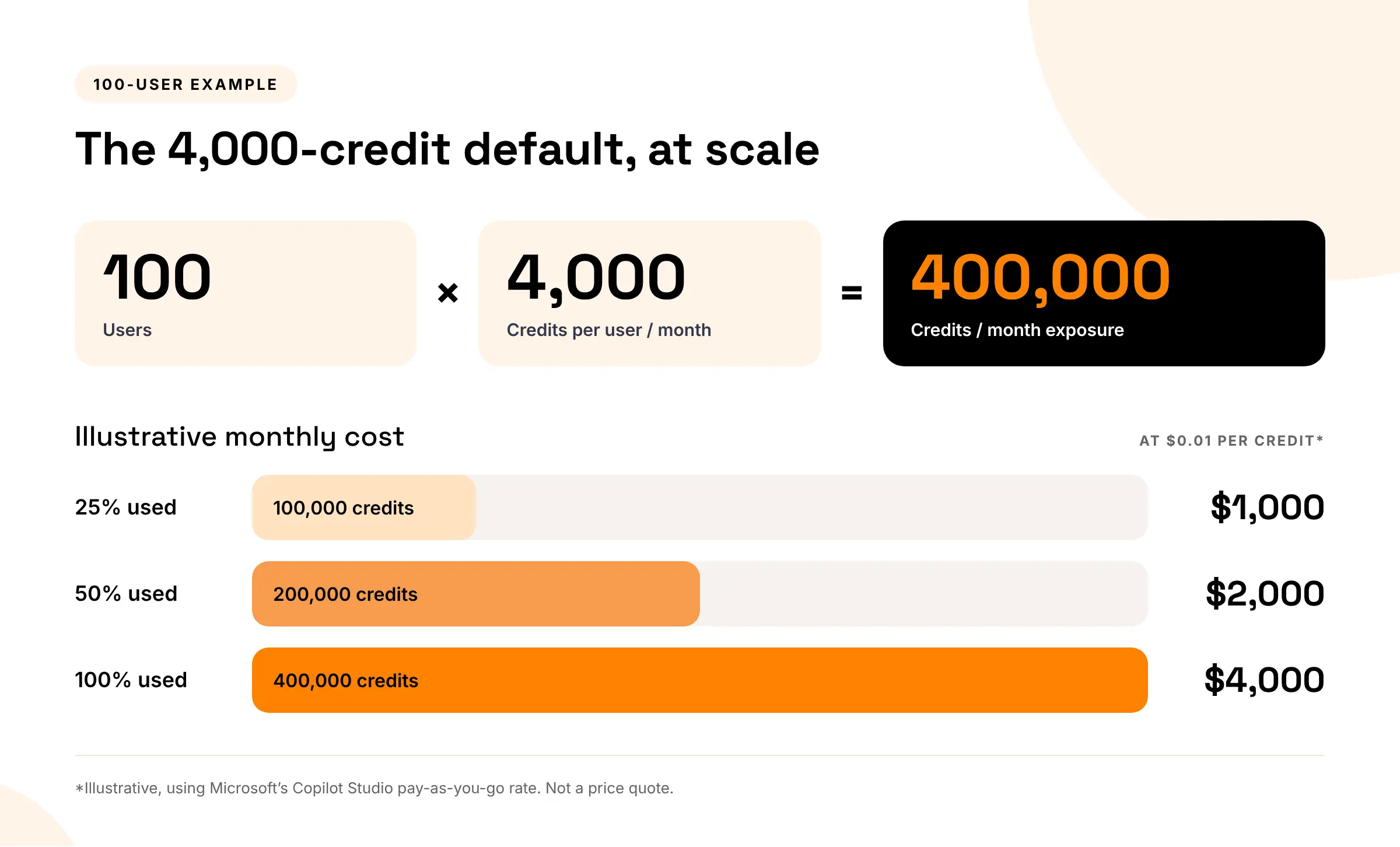
*These figures are illustrative, not a Copilot Business customer price quotation. The $0.01 rate is Microsoft’s published Copilot Studio pay-as-you-go meter rate. Actual charges depend on the applicable service meters, pricing arrangements, consumption, credits, and policy configuration.
Source: Microsoft Copilot Studio Licensing Guide.
What this means for your CSP business
Microsoft’s upcoming 2027 rollout will make it easier for eligible customers to access usage-based Copilot services. However, it also means your finance and operations teams must prepare for additional consumption charges. The 4,000-credit default is not a free allowance or an indication of actual usage. What matters is setting spending limits that match each customer’s needs and approved budget.
Start by identifying affected customers, reviewing their spending policies, and setting up usage alerts and approval processes. You will also need to ensure your billing system can accurately reconcile consumption charges alongside recurring subscriptions.
As Microsoft expands usage-based AI services, keeping consumption and billing under control will become essential for CSPs.
Related reading
- Azure Cost Overruns in CSP: How to Set Spending Guardrails, Alerts, and Overage Responsibility
- Azure Consumption Volatility: Why CSP Margins Are Becoming Harder to Predict
- Microsoft CSP Margin Compression: Causes, Signals, and Fixes
How CSP Control Center helps you manage Microsoft CSP billing
As Microsoft expands usage-based services, managing recurring licenses and variable consumption through disconnected spreadsheets can make billing increasingly complicated.
CSP Control Center helps Direct Bill CSPs and MSPs streamline their broader Microsoft CSP billing operations through integration with Microsoft Partner Center.
With C3, you can:
- Automate billing and invoicing: Generate itemized invoices using Microsoft subscription and consumption data.
- Track Azure consumption: Access usage reports and cost breakdowns to improve financial visibility.
- Manage customer pricing: Apply pricing and markup rules to support margin control.
- Simplify reconciliation: Reduce manual effort when matching consumption data to customer billing.
- Centralize CSP operations: Manage subscriptions, customers, and billing workflows from one platform.
Microsoft’s native tools remain responsible for Copilot Credit spending policies and enforcement. C3 helps support the billing operations around Microsoft cloud consumption.
Book a demo to make your Microsoft CSP billing more accurate, predictable, and scalable.
Frequently Asked Questions:
When will Microsoft automatically enable Copilot usage-based billing?
Microsoft has postponed the rollout to January to March 2027, instead of December 1, 2026. Usage-based billing will be enabled by default for qualifying new Microsoft 365 Copilot Business purchases. A new qualifying purchase can also activate usage-based billing for existing Copilot Business licenses in the same tenant.
Are 4,000 Copilot Credits free with Microsoft 365 Copilot Business?
No. The 4,000-credit default refers to a monthly per-user spending limit, not an included free allowance. Eligible usage-based services can generate additional charges based on actual consumption. Customers should review their billing configuration and any applicable prepaid credits to understand how consumption will be charged.
Can CSP partners reduce Copilot Credit spending limits?
Yes, CSP partners can manage applicable tenant-level and per-user spending limits through Microsoft tools, subject to platform-enforced minimums. More advanced user- and group-based policies can be configured through the Microsoft 365 admin center. Review the latest guidance before changing or attempting to disable spending policies.
How do Copilot usage-based charges appear on CSP invoices?
Microsoft records Copilot usage-based charges in existing Azure consumption reconciliation files, using identifiers such as Product ID, SKU ID, and Meter ID. These charges are distinguishable from recurring Copilot Business license charges. CSPs can use this information to reconcile consumption and prepare accurate customer invoices.